Lecture 02 — Deeper Dive

Frontiers: Continued

Jonas Ellert

IMADA - SDU Odense

2026-08-24
🚀 by Decker

Lecture 02 — Deeper Dive

Beamer-style Overlays with TikZ

Decker compiles TikZ through plain pdflatex, not through Beamer, so \onslide/\visible are not available directly.

The trick: render one complete picture per layer, stack the layers on top of each other with CSS, and drive their visibility with reveal.js’s fragment classes:

  • .fragment alone — hidden at first, fades in on its step and stays
  • .fragment .fade-out — visible from the start, fades out on its step

Layers appear in document order by default (first fragment = step 1, and so on), so put whatever should vanish last last in the source — its own step still fires whenever you place it in the sequence.

A Small Automaton, Revealed Step by Step
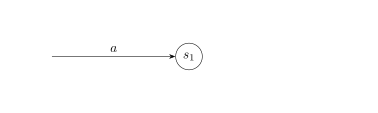
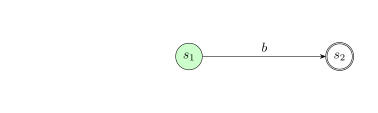
lecture-02-deck-code-a527e88f.tex.svg
lecture-02-deck-code-ba37cf8f.tex.svg
lecture-02-deck-code-99d486b3.tex.svg
  • Initially: only \(s_0\) exists
  • Click 1: \(s_1\) and the transition \(a\) appear, \(s_0\) stays
  • Click 2: \(s_1\) changes color and \(s_2\) appears as an accepting state, via \(b\)
  • Click 3: \(s_0\) disappears — it was visible from the start via .fade-out, not a fade-in

Every layer is an independent picture, so a node, edge, color, or label can appear, change, or vanish on its own step, just like a Beamer overlay.